Test the message
Before sending your invitation or reminder, you can preview how your message will appear by sending it to test recipients. This feature allows you to check only the appearance and content of the email, including merge fields.
NOTE: This is a test send: the recipients will not be added to the list, any entries made by clicking on the questionnaire link will not be recorded, and any links in the message will not be active.
-
From the Messages section, open the message you want to test in edit mode.
-
Click the Test the message button.
-
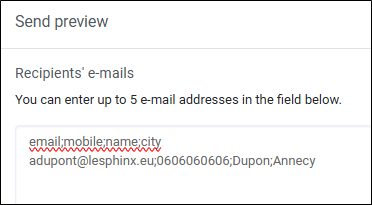
Enter the test email addresses.
NOTE: You can enter up to 5 email addresses maximum.
You may include merge fields (these must already exist in your recipient file).
-
Click Send.
A confirmation message (“The message preview has been sent successfully.”) will appear.