Create a codebook with AI
Use AI to generate a one-click codebook to identify the most recurring themes, including the most implicit.
NOTE: Only the data for the variable you have selected will be sent to the AI for interpretation. No other data from your study will be used.
To create a codebook with AI:
-
Access the verbatim codification modal for the variable in question.
-
Click on the button
 .
 First time user? Accept the AI terms of use
Acceptance of the general conditions specific to AI assistants is required.
-
Read the specific terms and conditions for AI Assistants carefully.
-
Check the following box:
-
"I acknowledge that I have accepted without reservation the ‘AI Assistant’ addendum displayed above and I declare that I am the legal representative of the holder of this account or have the authority to represent them validly and that I accept liability in the event of any false declaration".
-
-
Click on the I accept button.
-
-
(Recommended) Enter the context of the study so that the AI response is more precise.
Procedure for entering a study context
NOTE: This context will be used for all automatic interpretations in this study.
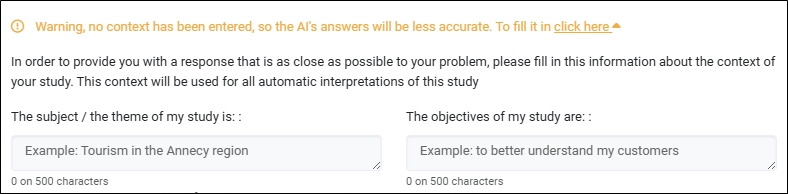
Click on the ‘click here’ link and fill in the following fields:
-
The subject / theme of my study is (maximum 500 characters).
EXAMPLE: Tourism in the Annecy region.
-
The objectives of my study are (maximum 500 characters).
EXAMPLE: To better understand my customers
NOTE: Do not communicate any sensitive information about your study subject or objectives.
-
-
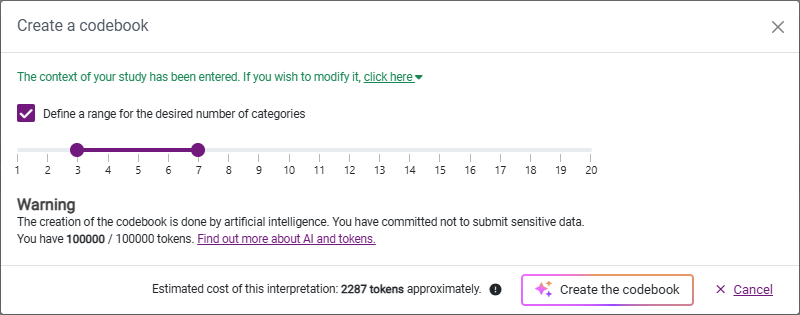
Define the range for the number of categories required.
-
By default, a range of 3 to 7 categories is applied.
-
Uncheck the Define a range for the number of categories option to let the AI automatically generate the appropriate number of categories.
-
-
Click on the Create the codebook button.
-
Warning! If a codebook is already in place, it will be deleted and replaced by the one generated by the AI.
-
Creating the codebook can take several minutes depending on the volume of verbatim.
-
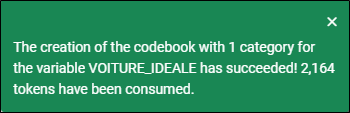
A notification will appear at the top right of the screen indicating the number of categories created.
-