Interpreting an analysis with AI
Make your data speak thanks to automated interpretation with AI.
Sphinx provides you with a written interpretation of your analysis in a matter of seconds, from the simplest (cross-tabulations) to the most advanced (AFC, ACP, K-means classification, CHD, multiple linear regression, etc.), generates a summary from a word cloud and much more. Learn more about AI features in our solutions on the Sphinx website.
NOTE: Only the data for the variable you have selected will be sent to the AI for interpretation. No other data from your study will be used.
To interpret an analysis using AI:
-
Select the analysis to be interpreted.
-
Click on the icon
 .
 First time user? Accept the AI terms of use
Acceptance of the general conditions specific to AI assistants is required.
-
Read the specific terms and conditions for AI Assistants carefully.
-
Check the following box:
-
"I acknowledge that I have accepted without reservation the ‘AI Assistant’ addendum displayed above and I declare that I am the legal representative of the holder of this account or have the authority to represent them validly and that I accept liability in the event of any false declaration".
-
-
Click on the I accept button.
-
-
(Recommended) Enter the context of the study so that the AI response is more precise.
Procedure for entering a study context
NOTE: This context will be used for all automatic interpretations in this study.
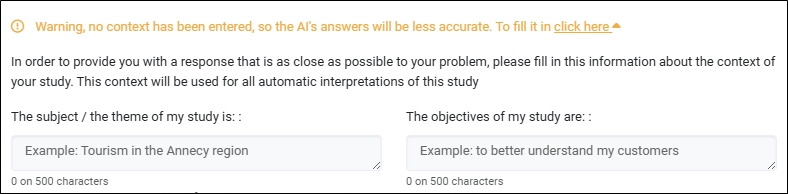
Click on the ‘click here’ link and fill in the following fields:
-
The subject / theme of my study is (maximum 500 characters).
EXAMPLE: Tourism in the Annecy region.
-
The objectives of my study are (maximum 500 characters).
EXAMPLE: To better understand my customers.
NOTE: Do not communicate any sensitive information about your study subject or objectives.
-
-
Click on the Result button.
The interpretation of the analysis by AI is displayed.
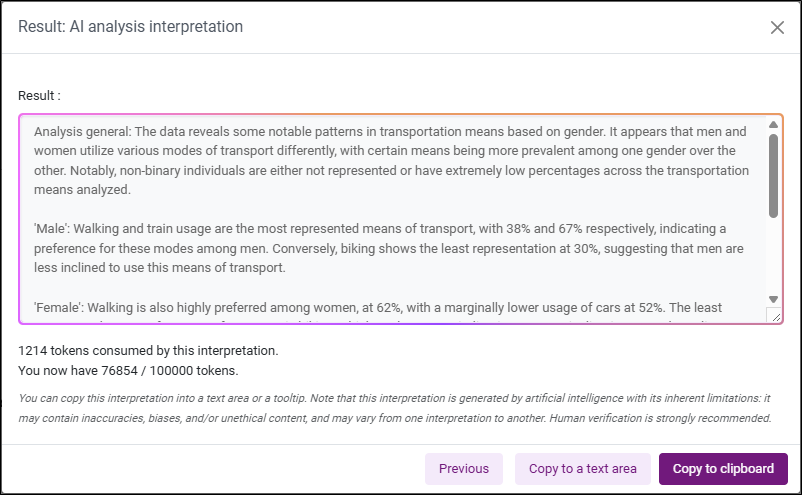
NOTE: Please note that the interpretation is generated by artificial intelligence, which has its limitations: it may contain inaccuracies, biases and/or unethical content, and may vary from one interpretation to another. Human verification is strongly recommended.
-
Click on Copy to clipboard to copy the interpretation.