SAVE, COPY, CLOSE A SURVEY
Save a survey
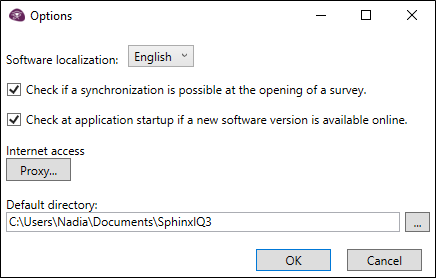
By default, Sphinx iQ3 proposes saving the surveys in the directory Mes documents\SphinxIQ3. It is possible to change the index by default. To do so:
-
Click on the File menu.
-
Click on the Options button (right below the menu).
-
In the dialog box, customize the default directory using the button
 .
It is important to regularly save when working on a survey:
-
On the Home Panel, click on the File menu.
-
Click on Save.
Make a copy of the survey
During the course of your work, you may need to make copies of your surveys as a backup or to allow someone else to have it on their computer:
-
Click on the File menu, then on Save as.
-
Choose a save location, modify (if necessary) the name of the survey and validate.
or
-
From the Recent projects.
-
Click on the
 button to duplicate a survey.
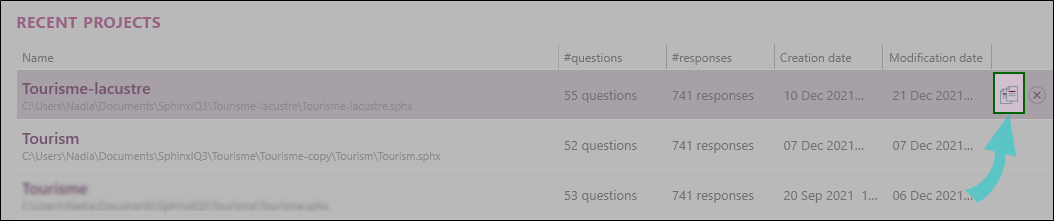
Following this saving, Sphinx iQ3 will switch directly to the new survey.
Close a survey
Here is help with the menus for closing sections of the Sphinx iQ3 software:

This cross, present on all screens, allows the complete closing of the Sphinx iQ3 software.

This cross, also present on most screens, allows you to return to the home panel of your survey.

This cross, accessible only from the home panel, allows you to close it and return to the home screen of the Sphinx iQ3 software.