Release Notes
4.35
(JUNE 2025)
Main New Features
AI*
-
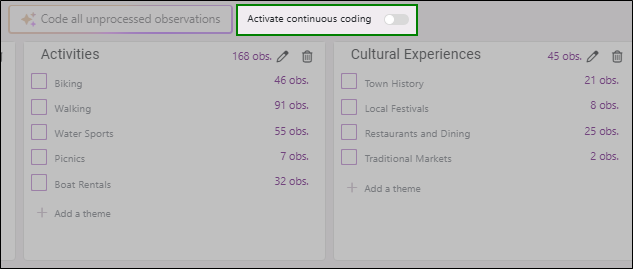
Major improvement in AI coding by adding an option to code new verbatim as responses come in. You can now create a coding in a few clicks, then activate this option for automatic updates. No need to check manually for new verbatim. It all happens automatically. A guaranteed time-saver.

-
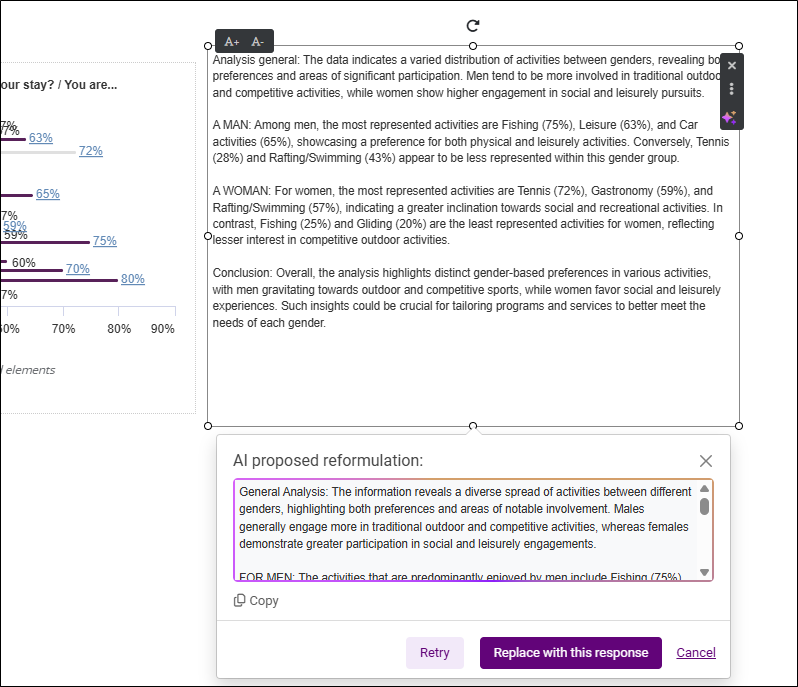
AI helps you rephrase the content of a text area in a view. This enhances the quality of the text or assists when you're short on inspiration.
Interface and Ergonomics
-
Functional and ergonomic improvements to the "Summary" tab. Now renamed "General", this tab includes several submenus containing useful information and files related to your survey. Easier and clearer to use! Details available further down in these release notes.
Migration from Old to New Version
-
The migration process for projects from the old version continues to improve by now allowing conversion of campaigns with "scheduled" or "delayed" sendings.
Analysis
-
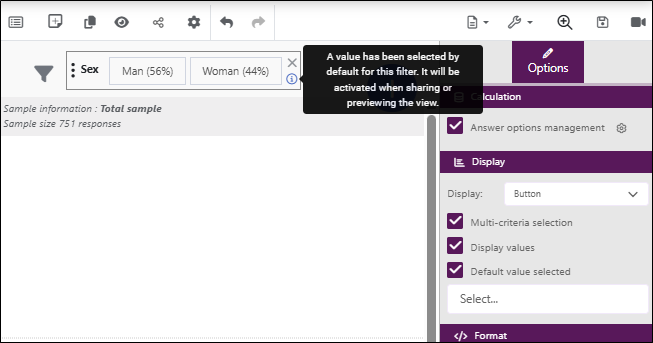
Added an option to select the default modality within a view filter. This lets users preview and share results with a filter applied by default.
Old Version 4.35
General
General
-
Integration of the Zapier connector (allows task automation and connecting Sphinx software with other apps). More info on Zapier's Sphinx page.
Bug Fixes
-
Improved project duplication: the zip file now takes the new project name.
-
Improved custom tables: it's once again possible to apply and remove filters on rows or columns.
-
Improved custom tables: selected units for rows or columns now display again in their titles.
-
Minor bug fixes
-
These fixes were already deployed in minor corrective updates.
Analysis
General
-
Performance optimization of view display
AI*
-
Added AI-based continuous coding in the "verbatim coding" analysis. When enabled, it regularly codes all uncoded verbatim.
-
Added "origin_coding" variable to identify whether coding was manual or AI-based.
-
Added an option to rephrase text content in an analysis view.
Tables
-
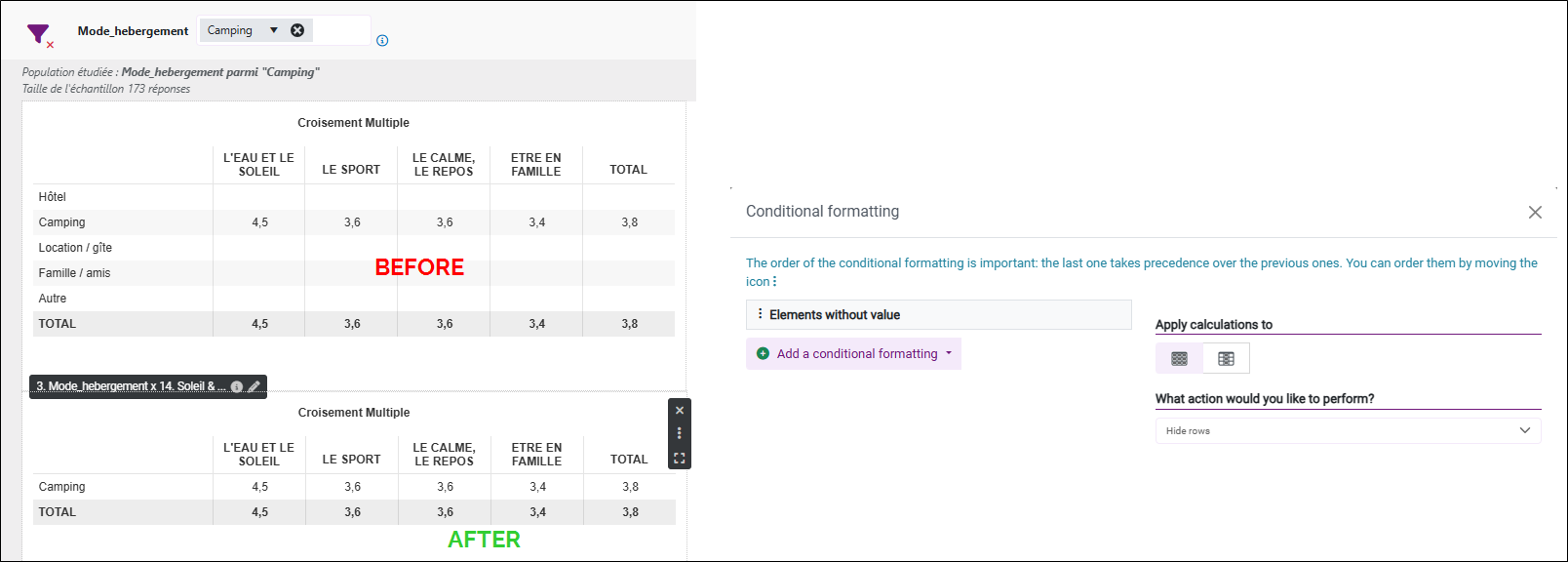
Added new conditional formatting to hide empty rows and/or columns in a table.
Visualization
-
Added an option to apply one or more modalities of a variable as filters across an entire view (only on closed variables).
Advanced Analysis
-
Improved "Keywords by Context" analysis by adding a filtering option for specific words. This makes the word cloud display only words specific to no particular context.
New Version 5.2.8
General
General
-
Added option to choose between "overwrite" or "duplicate" the project (renamed "study") when importing a project already present on the account.
-
Improved project duplication (renamed “study”), now with choice to duplicate data and analysis views.
-
Added disk space usage info in the "Usage tracking" page of the user account.
-
Added additional variable information in the structure section.
Interface and Ergonomics
-
Functional and ergonomic improvements to the "Summary" tab.
-
Renamed "Summary" to "General", now with submenus (summary, attachments, data tracking).
-
Added preview button to visualize the questionnaire from the summary page.
-
New "Supplementary Files" page to access and download all resource files.
-
Improved "Entry Tracking" page: restored graphs and added response trend over time and date filter.
-
New "Link Management" page: all questionnaire and reporting links are shown, including custom ones.
-
-
Moved the print button — now visible via the “preview” feature in the questionnaire editor.
-
Functional and ergonomic improvements to the project list.
-
Reintroduced "merge" feature, available when selecting two projects.
-
Unified project sorting in both list and card views.
-
Added export functionality for all projects.
-
API V5.1
-
Added diffusion-specific methods.
Bug Fixes
-
Improved project duplication: zip file now reflects the new name.
-
Custom table filtering can now be applied and removed again.
-
Units now appear again in custom table titles.
-
Minor bug fixes.
-
These fixes were deployed via minor updates.
Questionnaire
General
-
New "Structure" submenu to view all form variables and settings (required, jumps, etc.).
Distribution and Collection
General
-
New "PDF Print" tab added to the left menu to preview and print forms.
Distribution
-
Ergonomic redesign of the email/SMS channel to make it easier to use. The steps involved in creating a channel have been changed, as have the display of sends and recipients.
Sending
-
Improved SMS merge field management UI.
-
New options to regulate send frequency.
Migration from Old to New Version
-
Now possible to convert campaigns with "scheduled" or "automated" sends from old to new version.
-
Show delivery & tracking statistics and recipient details based on the version of Declic used.
Data
General
-
Added feature to review and print observations one by one.
-
Functional restoration of the “Sample Quality” page with a new stratification option.
Data Spreadsheet
-
New option to delete variables directly from the spreadsheet (visible on column hover).
Analysis
General
-
Performance optimization of view display
AI*
-
Added AI-based continuous coding in verbatim analysis.
-
Added "origin_coding" variable for tracking coding origin.
-
Text rephrasing option in analysis views
Tables
-
New conditional formatting to hide empty rows/columns
Visualization
-
Apply variable modalities as filters across an entire view (for closed variables only).
Advanced Analysis
-
"Keywords by Context" improvements: add filter option for specific words.
Reporting
General
-
Security improvement: Introduction of a periodic renewal of reporting access passwords.
Administration
Collaborative Accounts*
-
Added tracking of credit usage for collaborative accounts.
*: These features are not available on Connect type servers.